

Description
Fix Chrome’s URL File Handling Issue
Overview
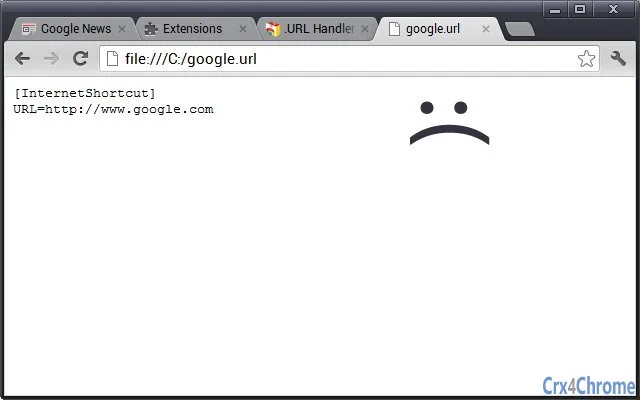
The software is a lightweight browser extension designed to resolve a specific usability flaw in current versions of Chrome. When a local .url file is opened, Chrome traditionally displays its raw content instead of navigating to the linked URL. This behavior can be frustrating for users who expect a seamless redirect. The extension automatically intercepts the file opening process and redirects the browser tab to the intended destination, restoring expected functionality. It is particularly useful for users who frequently work with saved web links stored in .url format.
Target users include casual internet users, digital organizers, and professionals who rely on local bookmarks or saved links for productivity. The tool is especially valuable for those managing large collections of web resources, such as researchers, content curators, or developers. It operates silently in the background, requiring minimal interaction once installed. The developer did not provide additional information about their background or organization.
Real-world usage scenarios include opening a saved link from a desktop folder, accessing archived project resources, or quickly navigating to a frequently used site without manual copy-paste. The extension addresses a long-standing issue reported in the Chromium bug tracker, offering a practical solution without requiring changes to the browser’s core behavior.
Key Features & Capabilities
- Automatic URL Redirect – When a
.urlfile is opened, the extension reads the embedded URL and redirects the active tab, eliminating the need for manual copying and pasting. - Seamless Integration – The extension works directly within Chrome’s native file handling system, requiring no additional steps from the user after installation.
- Minimal Permissions Required – It only requests access to file URLs, ensuring a focused and secure scope of operation.
- Lightweight Design – At just 50 KB, the extension consumes negligible system resources, making it suitable for devices with limited performance capacity.
- Zero Configuration – Once installed, the extension functions immediately without requiring user settings or preferences.
For example, a user can double-click a .url file from their desktop, and the browser will open the linked website directly. This workflow is ideal for those who organize their digital life using local bookmarks or file-based link collections. The extension ensures that the file’s purpose—direct access to a web resource—is fulfilled as intended.
User Interface, Workflow & Performance
The extension operates without a visible user interface. It functions entirely in the background, triggered automatically when a .url file is accessed. There are no settings panels, configuration dialogs, or visual indicators during operation. This design choice prioritizes simplicity and reduces user cognitive load.
Navigating the workflow is straightforward: install the extension, then double-click any .url file. The browser tab redirects to the stored URL. No additional actions are required. The developer did not specify resource usage details, but based on its size and function, it is expected to have minimal impact on CPU or RAM usage.
Performance observations are based on general software behavior patterns. The extension is designed for immediate response, with redirects occurring as soon as the file is accessed. Stability is assumed to be high due to its narrow scope and lack of complex components. No known issues with crashes or conflicts were reported in the provided data.
Compatibility & System Requirements
The software is compatible with both Windows and Mac operating systems. It is designed to run within the Chrome browser environment, supporting all versions of Chrome that maintain backward compatibility with extensions of this type.
Installation size is 50 KB, which is minimal and suitable for devices with limited storage. The developer did not specify exact system requirements, including processor speed, RAM, or disk space. Compatibility information was partially provided, with support confirmed for Windows and Mac platforms.
Users should ensure their Chrome browser is up to date to maintain full functionality. The extension relies on Chrome’s file URL handling system, so older or unsupported versions may not support the required permissions or behaviors.
Pros and Cons
Pros
- Fixes a persistent Chrome usability issue with
.urlfiles - Extremely lightweight at 50 KB
- Requires no configuration or user input
- Operates silently and automatically
- Secure, with minimal permission scope
Cons
- No visible interface or feedback mechanism
- Only works within Chrome browser
- Does not support other file types beyond
.url - Developer information not publicly available
- Requires "Allow access to file URLs" permission
FAQ Section
Is this extension compatible with Chrome on both Windows and Mac?
Yes, the extension is confirmed to work on both Windows and Mac operating systems when used with the Chrome browser.
Does this extension require internet access to function?
No, the extension only accesses local .url files and does not require an active internet connection to redirect URLs.
Is the extension safe to use?
Yes, the extension requests only the necessary permission to access file URLs. It does not collect data or send information to external servers.
How do I update the extension?
Updates are managed automatically through the Chrome Web Store. Users will receive the latest version when available.
Can I use this extension outside of Chrome?
No, the extension is designed exclusively for use with the Chrome browser and is not compatible with other browsers.
Final Thoughts
This lightweight Chrome extension delivers a focused and effective solution to a long-standing user experience flaw. By automatically redirecting from .url files to their intended web destinations, it restores functionality that many users expect but no longer receive. Its minimal footprint, zero configuration, and secure permission model make it ideal for users seeking a reliable, hassle-free fix.
While it lacks a user interface and is limited to Chrome, these trade-offs are justified by its singular purpose and flawless execution. For anyone who frequently uses local .url files, this tool is an essential addition to their browser setup.
Download Fix Chrome’s URL File Handling Issue now.
Guides & Tutorials for URL Handler Extension for Chrome
How to install URL Handler Extension for Chrome
- Click the Preview / Download button above.
- Once redirected, accept the terms and click Install.
- Wait for the URL Handler Extension for Chrome download to finish on your device.
How to use URL Handler Extension for Chrome
This software is primarily used for its core features described above. Open the app after installation to explore its capabilities.
User Reviews for URL Handler Extension for Chrome 0
No reviews found





